Wait—not only does it design a whole buildable set, it designs the 100+-page instruction book as well? What the actual duck is this?!
Runway’s reframing tech melts my brain
OMG, it’s like Photoshop’s now-ancient (!) Content-Aware Scale, times 10. Check out the thread below, or look in the album I made to gather its six eye-popping examples.
The model treats window size as another input, the same way it treats a click or a drag. Resize the frame and it renders a new composition for the space it has, not a scaled version of the old one. pic.twitter.com/mTpMe3enir
— Runway Labs (@runwayml_labs) September 21, 2026
“Love, Rendered”: Can AI remember it for you wholesale?
Honestly I have some very mixed feelings here: as the son of an elderly dad who’s facing increasing challenges around memory, I have a hard time even watching this trailer, much less the full film. Visualizing old memories, reanimating old friends… Is this a good idea? I have no idea, and emotionally I find I can’t much engage beyond the basic premise. Still, because it’s culturally interesting, and we’ll almost certainly see more explorations like this:
Ethelle and Burt have shared a lifetime together, but as Burt’s memory begins to fade, so too does the story of how their love began. Holding onto one cherished moment that was never photographed or recorded, Ethelle works with clinical experts and her family to recreate their first meeting using generative technology. LOVE, RENDERED is an intimate documentary short about love, memory, aging and the ways new tools may help preserve human connection. Directed by two-time Oscar-nominated filmmaker Liz Garbus and produced by Oscar winner Dan Cogan and Oscar-nominee Darren Aronofsky.
Interactive letter-plumping
Fun!
텍스트 입력하고 슬라이더 몇 개 만지면 타이포가
바로 살아 움직이는 그래픽으로 바뀜!특히 Inflate 켜는 순간 딱딱한 글자가 통통한 캐릭터처럼
부풀어 오르는 게 재밌다. 코딩 없이 이런 식으로 타이포 모션을
직접 가지고 놀 수 있는 게 꽤 신기함. pic.twitter.com/PRwqAtMAfk— 만원만 l manwonman (@manwon_man) September 18, 2026
Seems there’s a whole Insta feed full of related delights, like this:
Netflix asks, “You wanna get high (dynamic range)?”
Check out DiffHDR, which looks useful for making both captured & AI-generated vids more amenable to rich display and editing:
Most digital videos are stored in 8-bit low dynamic range (LDR) formats, where much of the original high dynamic range (HDR) scene radiance is lost due to saturation and quantization. This loss of highlight and shadow detail precludes mapping accurate luminance to HDR displays and limits meaningful re-exposure in post-production workflows. Although techniques have been proposed to convert LDR images to HDR through dynamic range expansion, they struggle to restore realistic detail in over- and underexposed regions.
To address this, we present DiffHDR, a framework that formulates LDR-to-HDR conversion as a generative radiance inpainting task in the latent space of a video diffusion model. By operating in Log-Gamma color space, DiffHDR leverages spatio-temporal generative priors from a pretrained video diffusion model to synthesize plausible HDR radiance in over- and underexposed regions while recovering the continuous scene radiance.
Our framework further enables controllable LDR-to-HDR video conversion guided by text prompts or reference images. To address the scarcity of paired HDR video data, we develop a pipeline that synthesizes high-quality HDR video training data from static HDRI maps. Extensive experiments demonstrate that DiffHDR significantly outperforms state-of-the-art approaches in radiance fidelity and temporal stability, producing realistic HDR videos with considerable latitude for re-exposure.
AI SVG FTW?
<Jerry Maguire voice> Show me the points!! But hey, if the output is clean & human-editable, this is awesome.
Damn the new @QuiverAI model is
It’s remarkably good at generating detailed SVGs – and it’s very fun to watch it draw.
I’ve been giving it random products and watching the model turn them into vector graphics https://t.co/kmhRjJbg1q pic.twitter.com/a6yB8qJ3XF
— Justine Moore (@venturetwins) September 17, 2026

(de)Face it: world models are the future
I will repeat it until I go blue: this kind of interactive model (in this instance from Runway) is either the future of Photoshop, or the replacement for it. There is no third way.
user inter-face pic.twitter.com/4D8eUPnAwX
— Always Generating (@notiansans) September 17, 2026
“Heat” -> “The Dark Knight”
Wow—until now I had no idea how much the Nolan brothers owed to Michael Mann & “Heat.” This great vid (ignore the dumb poster frame) offers some striking shot comparisons & parallel narrative choices. I think you’ll get sucked in.
Google Pics makes Nano Banana even more powerful
Check it out at pics.new.
Tutorial: Use Astra to drive After Effects
As I showed last week (i.e. ~3 million years ago in AI time!), it’s now possible to use AI to choreograph the creation of complex animations using After Effects:
Seriously…GPT 6 can do this now?
Here are the prompts i used: https://t.co/UVeZrYttn2
Try out Higgsfield: https://t.co/TqemDrxPBJ
GPT-6 can now control After Effects directly, designing any motion graphic you want from a simple style reference and building it out layer… pic.twitter.com/dzSfYtLzDw
— Rourke Heath (@rourke_heath) September 10, 2026
Here’s a solid 8-minute tutorial on how to get up and running:
Summary courtesy of Gemini:
The three-step workflow:
- Storyboarding (1:50 – 4:05): Before building, use Astra to generate a storyboard. This ensures visual alignment and prevents inefficient prompting loops. You can also provide reference videos for Astra to analyze and use as stylistic inspiration.
- Prompting & Building (4:05 – 6:23): Provide a detailed prompt to Codex describing your desired scenes (beats) and effects. You can use provided templates from the creator’s GitHub repository. The AI will then generate scripts, perform the animation in After Effects, and automatically check its own work before presenting the final project.
- Editing (6:23 – 7:52): Finalize your project using follow-up prompts to refine specific graphics, transitions, or audio. The creator emphasizes the importance of human oversight, especially for managing transition speeds between scenes.
A little prototype expression-changer
Cool work from Gabi on the Firefly team; see details in the tweet.
Ironically, Adobe shipped interactive expression control six years ago (!) in Neural Filters, and I left Google to return to work on that stuff at Adobe. The quality & generalizability of GANs let us down, however. It’s great to see continued progress now.
Quick prototype for character expressions at scale done with GPT Image 2.5! Made with a 5×5 image in @AdobeFirefly Boards. Used Claude extract each image and pull it into a little interface. pic.twitter.com/Tkck1AGf4R
— Gabi C. Duncombe (@gcduncombe) September 10, 2026
Go flat->layered with “Ad Delayer”
I can’t say I grok the name, but whatever: not unlike Canva’s Magic Layers feature, Ad Delayer promises, “The ad you already paid for becomes a working source file again.”
Ad Delayer from @bria_ai_ is now live on fal
– Recovers a layered, editable composition from a finished flat ad
– Headlines come back as SVG text, so localizing a variant is a structural edit, not a re-creation
– Layers arrive typed and ordered pic.twitter.com/cWWGKGZGr1— fal (@fal) September 9, 2026
Controlling a generative scene via Intangible 3D
I’m a fan of these guys. Charles is awesome, and my friend Philip (with whom I got my start in his pre-ILM/Pixar days) is leading product design. I’m excited to try out their “semantic scene architecture,” which promises to focus on outcomes rather than inputs:
My cofounder @cmigos (ex-Apple & Unity) shows how to animate cameras in Intangible’s semantic scene architecture.
Watch him stage the action, track a subject, and move the camera in 3D like he’s directing on set.
Then diffusion models render the precise shot he wants. https://t.co/GssIEa2khs pic.twitter.com/wU8zK9HR41
— Bharat Vasan (@bharatvasan) September 9, 2026
“AI Ruined My Life”
10/10 (er, 14 out of 10… fingers?), no notes.

GPT Astra driving AE & Premiere Pro
Desire to know more intensifies…
Editors used to spend HOURS to clean up in post-production.
AI can do that in a single prompt.
GPT-6 Astra + Higgsfield + After Effects. pic.twitter.com/nygLyHkhbs
— Higgsfield AI (@higgsfield_ai) September 7, 2026
Early feedback on @OpenAI ‘s GPT-6 Astra from a video editor
I have a strong feeling this is going to change EVERYTHING…
A concrete example: it recreated one of my edits completely on its own.
To test this, I simply asked it to reproduce an edit in @Adobe Premiere Pro. I… pic.twitter.com/yq2UfaEv00
— Eric Ker (@EricKerArt) September 7, 2026
Taking a surreal spin
Somewhere Christopher Nolan is rotating in an Inception level like this:
As surreal as it gets!
Incredible prompt pic.twitter.com/z0cFEdYOq0
— Umesh (@umesh_ai) August 30, 2026
Preserving LA’s commercial design history
I love this effort to make our visual past more accessible:
“Everyone in the world now has a 3D designer at their fingertips”
Insane that 3D worlds can be conjured straight from language, then rendered natively or used as guidance for AI-based rendering. Check out this demo from my former Adobe teammate Tom:
I had an early access to GPT-6 Astra and I can say, everyone in the world now has a 3D designer at their fingertips.
I gave it an image of a house and asked to create it in 3D with all the details including toys, appliances and furniture. This a full 3D model reconstruction in… pic.twitter.com/VuBOPQH0Ht— Tom Krcha (@tomkrcha) September 3, 2026
Days of Miracles & Wonder, man—always.
Behind-the-scenes thread:
Astra is very good at 3D modeling, and I can’t wait for all of you to experience it, for now here is a little walkthrough on how I built the demo house for our launch blog post. From a Blender scene to a Unreal Engine 5 walkable experience. Thread. pic.twitter.com/xGqe5iXoRv
— Thomas Ricouard (@Dimillian) September 3, 2026
And yet more magic:
I guess we’re allowed to talk about it now… Astra has absolutely blown my mind. I did get early access to test it out and it’s definitely felt like the biggest leap we’ve seen in a long time!
I asked it to make me a humanoid wolf in Blender, it used computer use, took control… pic.twitter.com/NFW9K073EJ
— Matt Wolfe (@mreflow) September 3, 2026
From Treadmill to Tightrope: Performance -> Animation
This node-based workflow from creator “Enigmatic E” turns human movement into a guide for video—in this case, of a Ninja Turtle:
This is a creative technologist in the truest sense. Startups and studios can’t hire enough of this person. https://t.co/IWMC9bZxO4
— Bilawal Sidhu (@bilawalsidhu) September 1, 2026
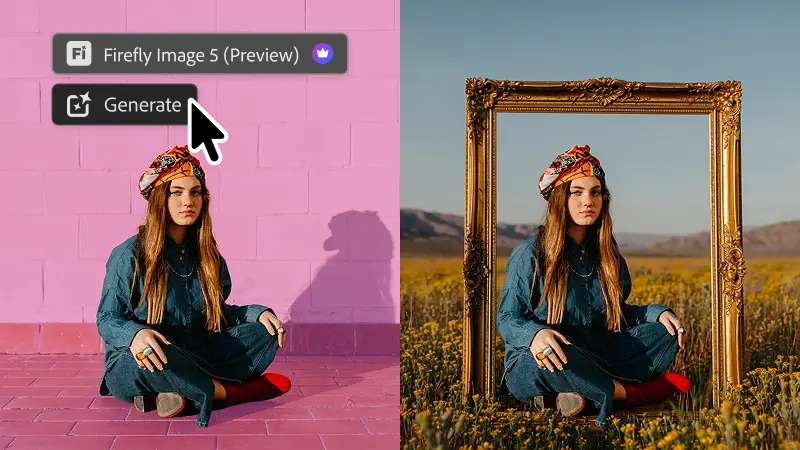
Photoshop combines generative imaging & masking
It seems I’m on something of a Photoshop kick lately (something something you can take the boy out of West 10, but…), so I’ll mention a couple of interesting-sounding enhancements that have landed in the latest release:
- Instruct Edit with Masks, powered by Firefly Image 5, understands the full context of your image so you no longer need to precisely mark every edit area yourself. Just describe the precise edits you’re looking for — such as opening closed eyes or placing a hat on a specific person’s head — with simple prompts. The unmasked areas remain untouched so your other important elements, like faces, logos, or brand assets, are protected.
- Light Adjustment Layer gives you professional-grade lighting controls — Exposure, Contrast, Highlights, Shadows, Whites, and Blacks — in a new non-destructive adjustment layer, so you get Camera Raw-level results without ever leaving your Photoshop layers workflow.
- Markup lets you visually communicate edits by drawing directly on an image to show the model what you want — select areas to recolor, sketch arrows to indicate position, or brush in rough shapes to suggest new elements — so you can get results that more closely match your vision while reducing the ambiguity of text-only prompts.
Omni Flash: Poolside AI
See, I just take Gemini to the dog park, but my teammate Genevieve took it all the way to the pool on vacation. There are levels to this stuff. 🙂
But seriously: this is a really nice visualization of the new clip-extension feature, among other things. That’s how the scene can run a full 30 seconds.
Fun with Omni 1.1 Flash by the pool video gen can be very finicky, but this new version feels extra good – more creative control with first/last frames, the ability to extend scenes, faster drafting at 360p – give it a shot! pic.twitter.com/BPzoOE33vv
— genevieveh@ (@genevieve__h) September 1, 2026
Visualizing a truly physical, semantically aware Photoshop
“Where we’re going, we won’t need layers…”
I’m not sure whether that’s true, but I am sure that the future—and increasingly, the present—of image creation and editing will look at lot and feel like this:
How it should feel: pic.twitter.com/lFHGi2QpjZ
— John Nack (@jnack) August 31, 2026
New Photoshop “Tune” feature offers generative control
What a cool approach to creative control. Looking forward to checking it out!
Photoshop has a new Assisted Editor (beta) with a feature called Tune where YOU create a slider to manipulate an image any way you want. It’s so impressive! Try it now in the full version of Ps and let me know what you think! pic.twitter.com/OPulCm2EkM
— Paul Trani (@paultrani) August 27, 2026
All the benefits of AI psychosis in a once-daily pill!
Emily Mattheson, bringing the fire once again. :-p
Going inside “God’s Eye View”
“It started as a slightly ridiculous question,” says Bilawal Sidhu: “How much of the planet can you make sense of from public data and a browser tab?
Being able to navigate & understand the world with a Jarvis-style UI is just magical.
Once aircraft, vessels, satellites, active fires, earthquakes, traffic, public cameras and physical infrastructure live on the same photorealistic 3D globe, it stops feeling like a pile of dashboards. It feels like a command center.
Amazingly, he’s made the whole thing open source. I just hope my man doesn’t get black-bagged by some dudes in a panel van. :-p
In this video I walk through the whole thing: ask the planet what’s happening over a cluster of military flights; jump into cockpit mode; voice-fly to points of interest, draw real boundaries and routes; move from city traffic into street cameras; inspect the physical internet; tune into radio around the world; and replay a recent Falcon 9 launch.
Lightroom adds Generative Expand, improved masking, and more
Great to see these solid, quality-of-life enhancements:
Higgsfield relighting looks wild
I’ll say it again: Forget the video component per se: interactivity like this is either the future of Photoshop, or it’s the replacement for Photoshop. There’s no third way.
Meet Higgsfield Relight
Add professional lighting to any shot after you shoot it:
> Drag lights around your subject from any angle
> Set color and brightness for each one
> Change the mood of an entire sceneNow available on Higgsfield. pic.twitter.com/C99CfGk8yR
— Higgsfield AI (@higgsfield_ai) August 26, 2026
Gemini Omni 1.1 Flash is here! 4k, clip extension and more
Come build beautiful things with higher resolutions (and lower: 360p is great for fast, cheap drafts), clip extension (up to 10s at a time, up to 40s total), better support for audio and video references, improved frame interpolation (specifying first/last frames), and more. Let’s tell great stories together. 🙂
From the official blog:
- More creative control with start and end frames. This helps keep the characters and narrative consistent as you thoughtfully transition between frames.
- Elevate your rough cuts into polished pieces. Export crisp video in 1080p or 4K, ready for high-end digital, social, or broadcast editing workflows.
- Draft videos quickly and upscale for quality. Test out concepts and compositions at a faster, lower-credit 360p resolution before committing to a full-resolution render. Once you have a clip you’re happy with, you can then download it in 720p resolution. This is particularly helpful in the Google Flow app — you can quickly draft videos on your phone on the go, and upscale your favorite versions.
See this thread for great examples, and please let me know if you have questions or requests. Onward!
Gemini Omni 1.1 Flash is our newest multimodal model for video generation and editing. It delivers a new suite of creative capabilities and controls for developers
With this update you can:
Extend your scenes
Specify starting and ending frames of a shot
Add video… pic.twitter.com/4fDzb5PdYz— Google (@Google) August 27, 2026
Get some perspective in Figma—literally
Check out this free tool:
Built a Figma plugin that puts vectors, text, groups and frames in perspective.
Couldn’t find a good one so I made it myself.
Create custom perspective grids, spheres, logos and mockups easy
Free in Figma community pic.twitter.com/mNQPsXVwj2
— Todels ☁ (@todelsz) August 21, 2026
Re-creating Golden Age Hollywood animation
Insane levels of visual richness are becoming insanely accessible:
Releasing STUDIO 1939, my hand-painted, golden-age animation LoRA for minimax H3, open weight !
This 5-minute film? Every shot in it was generated in under 4 minutes total. Faster than it plays.
The LoRA is available now.https://t.co/mIgrdYlqDD
And the turbo H3 model… pic.twitter.com/8MylT6esyZ— Lovis Odin (@OdinLovis) August 25, 2026
Fun with Omni Flash cartoon physics
Something something how to get a-head in generative video…? 🙂
messing around with cartoon physics in omni flash. it is just too good – the character consistency, the sound effects, all of it !! pic.twitter.com/qrlvSqijT8
— Vamsi Batchu (@vamsibatchuk) August 24, 2026
Every AI ad now
OMG, the accuracy…
Donkman Effeminate Forklifts FTW! :-p (I have no idea how she made it through this copy without completely cracking up—and per the comments, neither does she!)
Remembering Jay Maisel
Like so many folks in the extended imaging community, I was sad to hear of the passing of Jay Maisel. Though I never got to know him well, Jay was a familiar & colorful presence in the world of Photoshop and Lightroom. See some memorable recollections from Joe McNally.
Many years ago I had the chance to drop by the iconic converted bank building in the Bowery he occupied for nearly half a century. (This must’ve been before phone cameras got good, as otherwise I’d have shot the bejesus out of the place.) It was everything you’d hope it to be.
More recently, my father-in-law (having no idea about the visit) dialed up the documentary “Jay Myself” last night, and whole family (down to my then-12yo budding photographer son) loved it. I think you would, too!
Fun with Omni peech
(plural of pooch: “peech”; same for spouse/speece)
No doods were frightened in the making of this fiery display, made with our Google Omni Flash model:
For being an excitable puppy, Ziggy has stayed admirably chill around the new beast. #GoogleOmniFlash pic.twitter.com/Ta0ELlXMlL
— John Nack (@jnack) July 28, 2026
Nor were any steamed:
If you’re going on a dog walk and aren’t turning your pooch into a little steam engine using @GeminiApp, lol what are you even doing? #OmniFlash pic.twitter.com/5ALt5pju3l
— John Nack (@jnack) July 26, 2026
Change camera arc while maintaining motion
Still think that AI is all about slop-machine randomness vs. artistic control? CrossViewWarp (see details & more examples) is one of many emerging technologies challenging that view:
CrossViewWarp allows you to change the camera arc of an existing video while maintaining the motion.
Demonstration w/ LTX2.5 by @ChetiArt, link below. pic.twitter.com/VkKu841tTG
— Banodoco (@banodoco) August 17, 2026
Amazing realtime relighting
Wow—provided quality & resolution can be made high enough, tell me how soon tech like this can come to Photoshop & Lightroom:
Depth-aware light injection in TypeGPU
I got a 448×448 monocular depth model down to ~8 ms on my M4 Pro across ~250 dispatches, which is fast enough to use in realtime 😀
Since the inference is written directly in TypeGPU, I can just feed the depth buffer straight into the… pic.twitter.com/txDXqc88l6— Konrad Reczko (@reczko_konrad) August 18, 2026
“Accept the subpar bastardization of graphic design as we know it!”
17-minute self-righteous speeches FTW! :-p
My friend Dave (Adobe designer for Firefly video) brings his characteristic wit to the tribulations of just trying to “sell some junk” in the age of AI-infused design:
Getting buff in Yellowstone
Given that we’re taking our eldest son to start life as a University of Colorado Buffalo tomorrow (!), it was only fitting that we communed with a few real buffs in Yellowstone over the last few days. Here’s an Insta gallery:
View this post on Instagram
Bonus wildlife from the trip: in Boise we dropped by the The World Center for Birds of Prey and got to see this handsome crew in action. (Inside-baseball detail: hopefully you’d never know that I was obliged to photograph the first owl shown through a dense set of bars on his enclosure. Nano Banana in Photoshop to the rescue!)
Some amazing recent animations
It’s a very imperfect analogy, but I feel like as AI video fully passes the “can this pass for real” test, we’ll break into new & more interesting territory—much as painting did once photography took the “does this replicate reality” crown.
Here’s a handful of fun, beautiful animations rendered in a variety of styles. The fact of them being powered by new models is kind of incidental—as it should be: all that matters is what moves people & what helps artists do that.
Just think for a moment about the potential Seedance 2.5 has for children’s storytelling.
Bringing an animated story to life for your kids has never been easier.
Or more fun. pic.twitter.com/vzEljs3T7Z
— OscarAI (@Artedeingenio) August 7, 2026
@MiniMax_AI More from my H3 system, im addicted.. pic.twitter.com/CsV217filQ
— Machine Delusions (@Machinedelusion) August 10, 2026
With this illustration style, you can create absolutely beautiful animations in Seedance 2.5. https://t.co/AsdPSnhO68 pic.twitter.com/AtRNRcxgma
— OscarAI (@Artedeingenio) August 8, 2026
After watching this, tell me Midjourney + Seedance 2.5 isn’t an absolute dream combo.
The creative possibilities are endless. pic.twitter.com/zXaKdAIF72
— OscarAI (@Artedeingenio) August 12, 2026
An AI e-clipse
Maciej Dobrodziej writes,
Today, a solar eclipse over Poland. The first such one in 72 years. The last time people looked up at the sky like that was in 1954 – through soot-covered glass, on Constitution Square in Warsaw. I froze that moment and flew through it with a camera. All the way to the sun. Zdzisław Wdowiński / PAP, 1954
Dziś zaćmienie słońca nad Polską. Pierwsze takie od 72 lat.
Ostatni raz ludzie patrzyli tak w niebo w 1954 roku – przez zakopcone szkiełka, na Placu Konstytucji w Warszawie.
Zamroziłem tamten moment i przeleciałem przez niego kamerą. Aż do słońca.
Zdzisław Wdowiński / PAP,… pic.twitter.com/DwRa93kMPH
— Maciej Dobrodziej (@M_Dobrodziej) August 12, 2026
Taking Nano Banana on the road
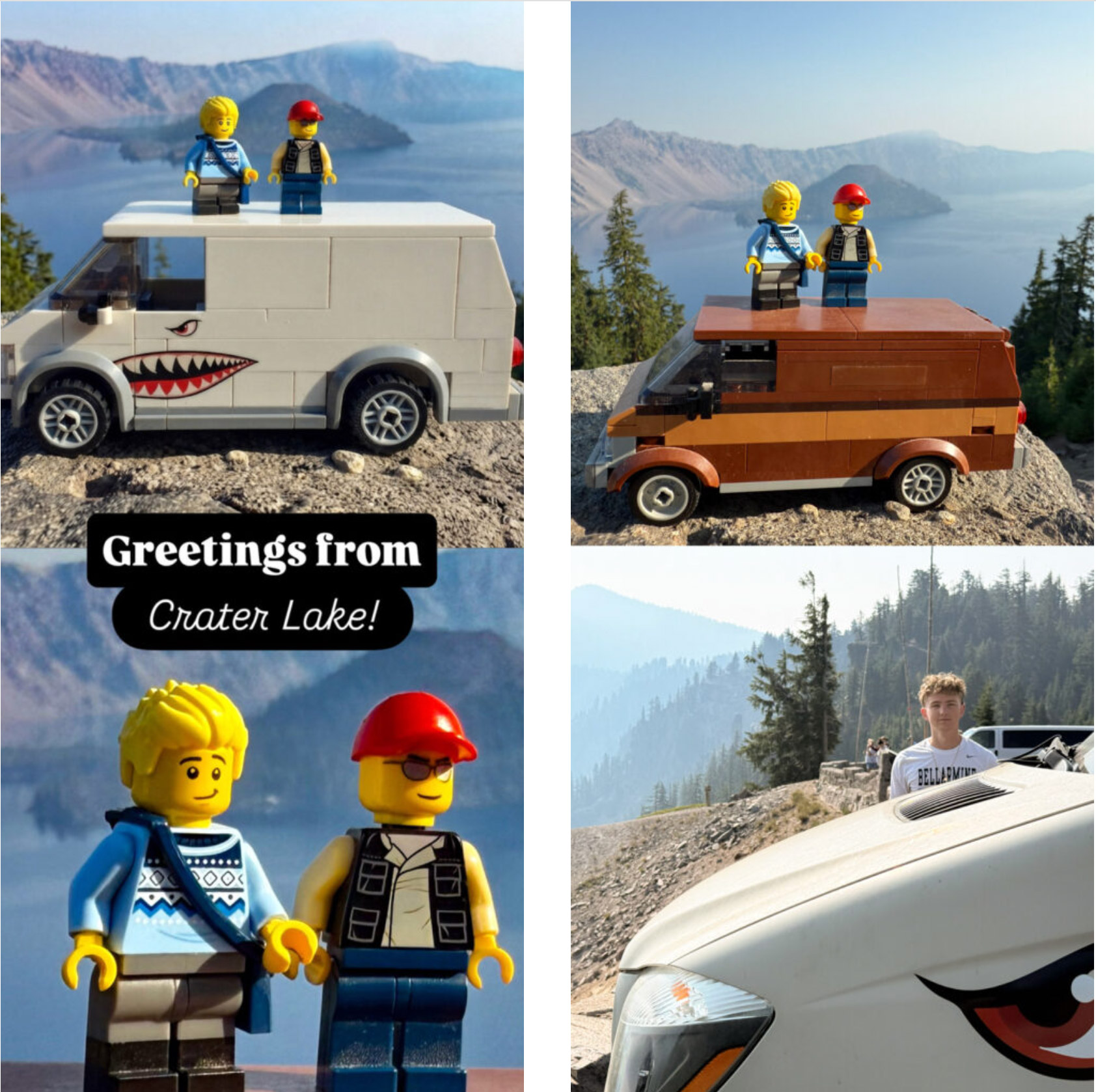
Greetings from the midst of our bittersweet (but mostly very sweet!) roadtrip to take Finn off to college in Boulder. Me being me, I of course brought our Lego selves to use in making arguably cringey (#jeezdad) family pics. I don’t have a precise match for our newly modded van, so I brought the closest equivalent & then gave Gemini a reference image to use with Nano Banana. Not bad, robot—not bad at all:
Head-spinning photo->3D
I have no words for this kind of witchcraft. In case the embedded tweet doesn’t show up in English, here’s a translation:
Wow. Maciej Dobrodziej – a digital creator – has “brought to life” one of Warsaw’s most famous photographs. The photo of a girl running in the rain on Puławska Street was taken by Zbigniew Siemaszko in 1968. Fun fact: After many years, it was possible to find Ms. Grażyna, who is the heroine of the photo. She recognized herself upon seeing… the photograph on FB.
Wow. Maciej Dobrodziej – twórca cyfrowy „ożywił” jedno z najsłynniejszych zdjęć Warszawy. Fotografie biegnącej w deszczu dziewczyny na ulicy Puławskiej zrobił Zbigniew Siemaszko w 1968 roku.
Ciekawostka: po latach udało się odnaleźć panią Grażynę, która jest bohaterką zdjęcia.… pic.twitter.com/tvNJJjlka3
— tomasz.golonko (@TomaszGolonko) August 9, 2026
Elsewhere, Bytedance helps you explore similarly, specifying camerawork just by drawing lines on an image:
Higgsfieldが画像上に線を引くだけでカメラワークを指定できる新機能(Seedance 2.5)のデモを公開
描いた軌跡通りにカメラが追従(モナリザの周囲を回る動き等)
角度や速度を長文テキストで指示する手間が不要に
Seedance 2.0/2.5の4K無制限キャンペーンも実施中情報元はリプ欄。 pic.twitter.com/zfaOj1t8wT
— Sadao Tokuyama (@tokufxug) August 9, 2026
Wait for me, Penelope…
“A.I. sing of arms and the man…” Wait—that was the Aeneid, but Imma go for it.
This reimagining of The Odyssey—nailing everything from casting to an apparently generated period-accurate song that actually slaps—demonstrates my long-running contention that when things become amazing enough, we can’t even process them.
People see this and neither marvel at the incredible state of technology (which has leapt forward in just the last couple of weeks), nor point out little shortcomings here & there, nor even get into another fruitless battle about the ethics of AI. Instead, at least from where I sit, I see them simply commenting on the concept & storytelling.
Which, I think, is how it should & will be.
Put your hands together—literally—for the music of MediaPipe
It’s so fun to see work from a past life enabling whole new modes of expression!
Who knew PMF for MediaPipe hand tracking would be performance art for social media 🙂
One of the unpredictable things about vibe coding is it breathes new life into tech that’s been around for ages and gives it a new audience. Threejs is another example. pic.twitter.com/QimPPiCOj7
— Bilawal Sidhu (@bilawalsidhu) August 4, 2026
Taking a different approach to hand tracking & creativity, check out this Omni experiment:
Still finding ways for Omni to blow my mind https://t.co/YzqQI3Cg1I pic.twitter.com/WRgnZxIY37
— fofr (@fofrAI) August 3, 2026
From Nano Banana to Beast Mode
As I walked the dogs past our new camper van a few weeks back, Pinterest happened to send me some vintage World War II aircraft art. I thought, heh, how nuts would it be to give the van shark teeth? I snapped a quick pic of the van, popped it plus one of the shark mouth designs into the Gemini app, and had Nano Banana mock up the possibilities:

This helped me bring the inimitable & indulgent Margot onboard with the idea, and soon enough I found myself in Illustrator, recreating the art the old fashioned, point-by-point way. Upon seeing the design, the local graphics shop advised me on some needed mods, so I hopped into Photoshop to oblige, invoking a dash of Generative Fill. Check out the (very real!) results.
To me this is just how AI ought to work—not as a creative replacement, but rather as an accelerant that lets us try more things & communicate ideas better.

Flow to the Upside Down
Fill your head with sweet 80’s synth chords, using Google Omni Flash to reimagine suburbia as a sci-fi dreamscape:
Transform any scene into the Upside Down using Gemini Omni Flash in @FlowbyGoogle.
Prompt: The video starts completely normal, showing the original, unmodified scene. Immediately after the start, a slow, detail-by-detail transition into the ‘Upside Down’ dimension begins. The… pic.twitter.com/gBDARHgjR5
— CHRIS FIRST (@chrisfirst) July 20, 2026
Thank you, Dr. Cerf
“Correlation is not causation,” and I hope that Internet pioneer Vint Cerf announcing his retirement from Google has nothing to do with my return. 😉
The news brings to mind a couple of fun memories:
Semi-legendary story: Some Googler was chilling in what he thought was a conference room named “Vint Cerf,” only to have the real man walk in and politely shoo him out of what was actually his office.
— John Nack (@jnack) May 8, 2022
“Taste” sucks
I’ve been trying to put my finger on exactly why the AI-related buzzword du jour gets under my skin. “Taste” is anything but new, yet I can’t stand the way it gets bandied about, like some mystic shibboleth, by grasping little growth hackers.
I’ll have more to say about this (aren’t you lucky!), but I’m reminded of my all-time favorite Steve Jobs clip. He gets at “taste” being a function of work, curiosity, and hard-won love of the excellent.
If a YouTube clip could be worn out like vinyl, I’d have done so long ago, given how many times I played it for teammates at Microsoft. Steve was right 30 years ago & he’s right now. Just buying some Aeron chairs ain’t gonna flip that switch…
Joy-scrolling 3D
I love the art direction on this site, where the pace of animation is controlled by your scrolling:
Japanese designers are goated, but have you seen the devs? This experimental piece from Hiroto Sato is next level pic.twitter.com/c4cp6dWlbx
— Edoardo Lunardi (@edo_lunardi) July 17, 2026
Meanwhile the “Scroll World” Claude skill promises to interview you (!), then whip something up with the help of generative text-to-video tech (gotta get Omni in there!).
I built a skill to let my Claude Code build premium landing pages like this in one shot. The 3 sites in the video are one-shot results, ~$10-15 each.
Register @higgsfield_ai , install the CLI and scroll-world skill, hand the rest to Claude Code. pic.twitter.com/dO6XJaF7MI
— Peter Wang (@the_cyw) July 9, 2026
How it works is intriguing enough to quote at length from the GitHub page:
—–
It leans on Higgsfield for the art: cohesive isometric diorama scenes (GPT Image 2 — via Higgsfield, or the Codex CLI on a ChatGPT subscription) and the camera flights themselves (Seedance or Kling image-to-video — only models that can frame-lock a seam), scrubbed by scroll position — the same technique behind Apple’s scroll-through product pages. The camera genuinely moves; scroll only drives time. It’s framework-agnostic: you get the Higgsfield pipeline, the prompt templates, and a portable vanilla-JS scrub engine that drops into plain HTML, Next.js, Vue, or a Python-served page — nothing assumes a stack.
When invoked, the skill:
- Interviews you — the subject/industry + pitch, a brand kit (import from a URL, hand it over, or have it proposed), art direction, the ordered scenes the camera visits, whether you want the mobile version (a second chain rendered natively in 9:16 portrait — composed for phones, not a crop of the landscape film), and the budget — render tiers and stills source shown with estimated credit costs, approved before anything generates.
- Generates the assets — one still per scene, one “dive-in” camera clip per scene, and the connector clips that join consecutive scenes, generated from the actual rendered frames of their neighbours so every seam is frame-identical. Mobile opt-in renders a parallel portrait chain the same way, frame-locked against its own 9:16 renders.
- Wires it up — a config-driven scroll engine that plays the whole chain as one flight, serving the portrait clips and posters automatically on phones.
The Mutha Fo’ Fathers
Crossing (virtual) paths with the JibJab OGs after 25 reminds me to belatedly share some tangentially America 250-related Friday fun: